
Download TopTracker – Free Time‑Tracking & Invoicing Tool for Freelancers & Teams
Overview
TopTracker is a free, cross‑platform time‑tracking and invoicing solution designed for freelancers, small agencies, and clients who need a transparent way to monitor work hours and generate accurate bills. Built with a clean, intuitive UI, the application lets users switch seamlessly between Projects, Reports, and Invoices, ensuring that every minute logged translates into a reliable line item on a professional invoice. Whether you are a contractor looking to prove the value of your work or a manager trying to control payroll expenses, TopTracker provides a straightforward dashboard that captures billable time, produces detailed activity reports, and automates the invoicing process.
The tool positions itself alongside well‑known project‑management utilities such as Easy Time Tracking and GanttProject, but it narrows its focus to the essential needs of time documentation and payment collection. While it does not currently integrate with large‑scale ERP systems or advanced CRM platforms, its simplicity, zero‑cost model, and secure data handling make it an attractive entry point for anyone who wants to keep financial records tight without a steep learning curve. TopTracker also offers a cloud‑based sync feature, allowing users to access their data from Windows, macOS, Android, and iOS devices, ensuring that work can be tracked on‑the‑go and invoices can be generated from any location.
The following sections dive deeper into the core features, installation steps, platform compatibility, and the pros and cons that will help you decide if TopTracker is the right fit for your workflow.
Core Features of TopTracker
- Accurate Time Capture: Start, pause, and stop timers with a single click, or log time manually for past activities.
- Project & Task Organization: Group hours under specific projects, clients, or tasks for granular reporting.
- Automatic Activity Monitoring: Optional background monitoring records application usage, idle time, and screenshots (optional for privacy).
- Customizable Invoicing: Generate PDF invoices directly from logged hours, add taxes, discounts, and company branding.
- Detailed Reporting Engine: Export CSV or Excel reports that break down time by day, project, or team member.
- Multi‑Device Sync: Cloud sync keeps data consistent across Windows, macOS, Android, and iOS.
- Client Portal: Share read‑only project dashboards with clients so they can verify work without accessing your internal data.
- Secure Data Storage: All data is encrypted in transit using TLS 1.2, and stored on secure servers compliant with GDPR standards.
- Free Forever Model: No hidden fees, subscription plans, or premium tiers—every feature is available at no cost.
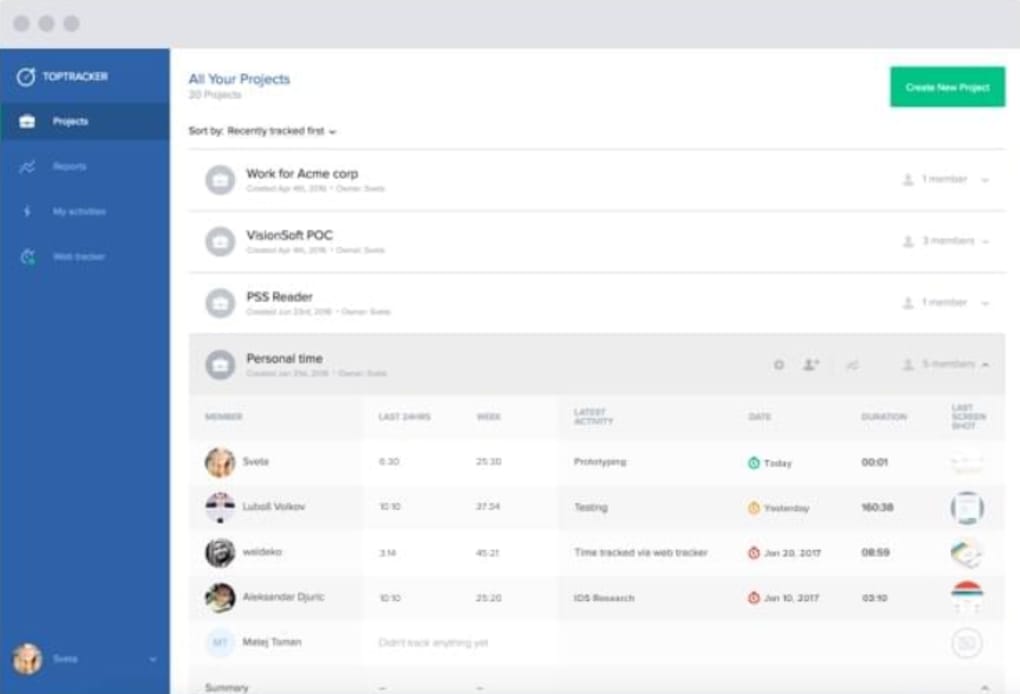
These capabilities are wrapped in a minimalist design that emphasizes clarity over clutter. The dashboard presents a quick overview of today’s tracked time, upcoming invoicing deadlines, and recent project activity. Users can drill down into each entry, edit notes, or assign billable rates on the fly, making it easy to adjust for overtime, discounts, or non‑billable activities.
The client portal is particularly valuable for freelancers; by providing a transparent view of logged hours, you reduce disputes and accelerate payment cycles. While TopTracker does not yet offer built‑in integrations with popular accounting suites like QuickBooks or Xero, its export options allow you to import data manually, preserving flexibility for those who rely on third‑party financial tools. The application also respects privacy preferences: screenshots and activity logs can be disabled on a per‑project basis, ensuring that sensitive client information remains confidential.
Installation & Usage Instructions
Getting started with TopTracker is intentionally simple. Follow these steps to install the software on your preferred platform and begin tracking time within minutes.
Step‑by‑Step Installation
- Download the Installer: Visit the official TopTracker website and click the “Download for Windows,” “Download for macOS,” “Download for Android,” or “Download for iOS” button, depending on your device.
- Run the Installer (Desktop): For Windows, run the
.exefile; for macOS, open the.dmgand drag the app to your Applications folder. Follow the on‑screen prompts to accept the license agreement. - Mobile App Installation: Open the App Store (iOS) or Google Play Store (Android), search for “TopTracker,” and tap “Install.” The app will request permission to run in the background for activity tracking.
- Create an Account: Launch the app and sign up using an email address or social login (Google or Microsoft). Verify your email to activate the account.
- Set Up Your First Project: Click “New Project,” give it a name, assign a client, and define a billable hourly rate. You can also add task categories for deeper granularity.
Basic Usage Workflow
Once installed, using TopTracker follows a predictable pattern that minimizes distraction:
- Start a Timer: Select the project you’re working on and click the “Start” button. The timer will appear in the top bar, showing elapsed time.
- Add Notes: While the timer runs, you can type short notes describing the activity, which later appear in reports.
- Pause or Stop: When you take a break, hit “Pause.” To end a session, click “Stop,” and the entry is saved automatically.
- Review Daily Log: Navigate to the “Reports” tab to see a summary of today’s logged hours, grouped by project or task.
- Generate an Invoice: In the “Invoices” section, select a date range, choose the client, and click “Create PDF.” Attach the file to an email or upload it to a client portal.
The cloud sync feature ensures that any changes you make on your desktop are reflected on your mobile device within seconds. If you switch between a laptop and a tablet during the day, you can continue a timer on one device and stop it on another without losing data. TopTracker also includes a “Settings” area where you can configure notifications, privacy options (such as disabling screenshots), and default currency for invoicing. The learning curve is shallow; most users report feeling comfortable after their first project is set up.
Compatibility, Pros & Cons
Supported Operating Systems: Windows 10 and later, macOS 10.14 and later, Android 6.0 and later, iOS 12 and later. The application runs natively on each platform, offering consistent UI and feature parity across desktop and mobile environments.
Pros
- Completely free with no hidden subscription fees.
- Cross‑platform support allows seamless tracking from any device.
- Robust invoicing module eliminates the need for separate billing software.
- Detailed, exportable reports help with tax preparation and client transparency.
- Secure, encrypted data storage meets GDPR and other privacy regulations.
Cons
- Lacks native integrations with popular accounting tools (QuickBooks, Xero).
- Scalability is limited; not ideal for large teams or enterprise‑level project management.
- No built‑in Gantt chart or advanced task dependency features.
- Customization options for the UI are minimal.
- Offline functionality is basic; full sync requires an internet connection.
Overall, TopTracker shines for individual professionals and small groups that value simplicity and cost‑effectiveness. The absence of deep integrations means you may need to perform manual data transfers if you rely on sophisticated accounting pipelines. However, the core time‑tracking and invoicing capabilities are solid, reliable, and backed by a secure cloud infrastructure.
Frequently Asked Questions
Is TopTracker really free or are there hidden costs?
TopTracker is 100 % free. All features—including time tracking, reporting, and invoicing—are available without any subscription tier or pay‑per‑user model. The developers sustain the service through optional donations, but no user is ever forced to pay.
Can I use TopTracker on multiple devices simultaneously?
Yes. TopTracker’s cloud sync lets you log time on a Windows laptop, pause on an Android phone, and finish on an iPad—all without losing any entries. The data is merged in real time, ensuring a single source of truth.
Is my data safe and compliant with privacy regulations?
All communication between the client app and TopTracker servers is encrypted with TLS 1.2. Data at rest is stored on GDPR‑compliant servers, and users can disable screenshot capture or activity logging per project to meet stricter privacy policies.
Can I export my time logs to Excel or CSV?
Absolutely. The “Reports” section includes an “Export” button that generates CSV or Excel files, allowing you to import the data into any spreadsheet or accounting tool you prefer.
Does TopTracker integrate with other project‑management tools?
Currently TopTracker does not offer direct integrations with tools like Asana, Trello, or Jira. Users can manually copy project names or use the CSV export to sync data, but an official API or native connector is not yet available.
Conclusion – Should You Download TopTracker?
TopTracker delivers a polished, free solution for anyone who needs reliable time tracking paired with built‑in invoicing. Its cross‑platform availability, intuitive UI, and secure cloud sync make it an ideal choice for freelancers, consultants, and small agencies that want to maintain transparency with clients while streamlining payment collection. The trade‑off comes in the form of limited scalability and a lack of deep integrations, meaning larger teams or businesses that depend on extensive ERP ecosystems may outgrow the tool.
If your primary goal is to track billable hours accurately, generate professional invoices on the fly, and keep your data secure without paying a subscription, TopTracker is worth the download. Give it a try, set up a test project, and see how the clean dashboard and automatic reporting improve your workflow. Download TopTracker today and start turning every minute worked into a verified, payable invoice.







